Ashampoo Burning Studio
Ashampoo Burning Studio is a complete burning suite that includes all the tools you need to burn CD, DVD and Blu-ray discs in your computer.
The good thing about Ashampoo Burning Studio is that it offers a rich variety of tools to burn data, backup files, create movie and photo slideshows and print labels and covers, while maintaining great usability thanks to a well-organized menu. All you have to do is browse the menu on the left of the interface, select the appropriate task and Ashampoo Burning Studio will open the corresponding tool in a new window.
There are some outstanding new features in this version of Ashampoo Burning Studio. One is the video disc preview player, which emulates the entire disc menu and lets you interact with it; another one is the integrated audio player for audio CD; and finally, the Autoplay editor, with which you can easily build interactive menus that run automatically when the disc is inserted.
The only drawback, if any, is the fact that Ashampoo Burning Studio is not integrated with Windows Explorer: it would have been great to burn files or folders straight away just by right-clicking on them.
Ashampoo Burning Studio is a full-featured yet easy to use burning tool with support for Blu-Ray, built-in players, label and menu editors, and many other interesting features.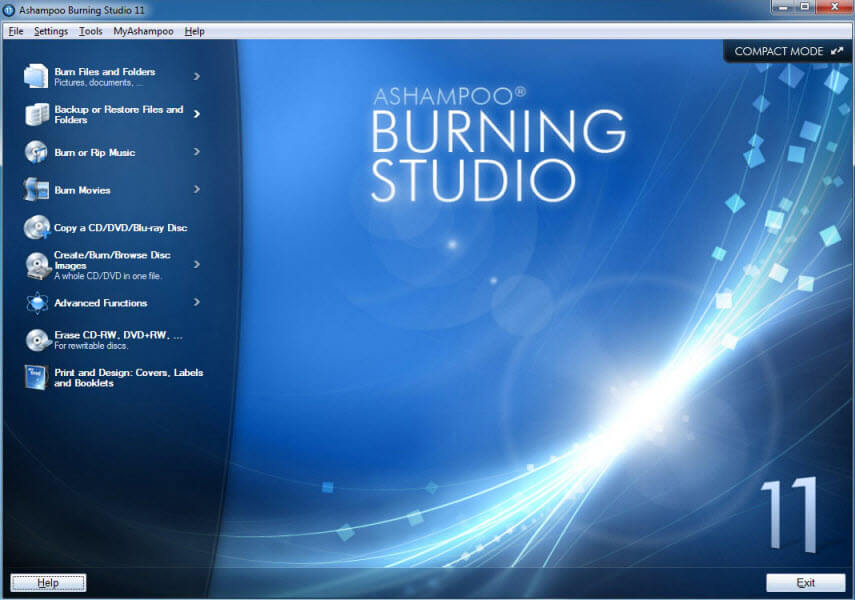
If you are looking for a superior, full-featured burning suite which is also amazingly easy to use – you should definitely check out Ashampoo Burning Studio 11.
Nero Lite installer includes following products:
- Nero BurningROM (Included in Micro version);- Nero Express (Included in Micro version);
- Nero Cover Designer;
- Nero WaveEditor;

To use Nero 11 Lite you need to have valid a serial.
Nero Lite installer information:
- Size: 48.95 MB
- MD5: 3d9494b4c4760dc2b55ce3e19ded2b4a
Nero Lite installer - Micro information:
- Size: 37.36 MB
- MD5: 9268da1b6739a165ea19e2146e791bb2
Nero 11 Requirements:
- Windows Installer 3.1 or higher
- Microsoft Visual C++ 2005 SP1 Redistributable (included into installer)
- Microsoft Visual C++ 2010 (included into installer)
Advantages of Nero Lite/Micro edition:
- Smaller download size;
- Smaller footprint on the system (smaller installation size and much less registry entries written)
- 10 times faster installation, if not more
- Even faster uninstallation, maybe 20 times faster
- Uninstallation removes all traces of Nero that were added by Lite/Micro installer.
More info:
- Nero Lite will take 250 MB space on your HDD, when all applications are installed. Nero Lite - Micro, will take 140 MB if all applications are installed.
To install Nero Lite (or Micro) completely silent use the switches in this way:
nero_lite_installer.exe /unattended /serial=XXXX-XXXX-XXXX-XXXX-XXXX-XXXX-XXXX-XXXX
XXXX-XXXX-XXXX-XXXX-XXXX-XXXX-XXXX-XXXX represents your serial. You need to enter it with dashes and WITHOUT any quotes. If you did not type switches correctly or you did not enter serial in correct format installer will not start installation, and you won#39;t get any message that installation did not start.
Using silent switches is only possible with valid keys. There is no way to combine it with keygen.
Uninstaller is included, but it won#39;t be showed in Add/Remove programs. You will have the shortcut in Start Menu of it and you can use the installer for uninstall. After uninstall you will probably have to reboot (you#39;ll get prompt if needed) because some files are in use and can be only deleted after reboot. Do not try to install again Nero if you did not reboot after uninstall, because commands are added which will delete remaining Nero files/folder on next reboot (if prompted for reboot). So, if you don#39;t get prompt for reboot, you can (un)install as many times as you want without reboot.
If your antivirus reports that Lite or Lite - Micro installer is some kind of a virus that is false positive and you can ignore it.
